 BoreTherm
Annual profile
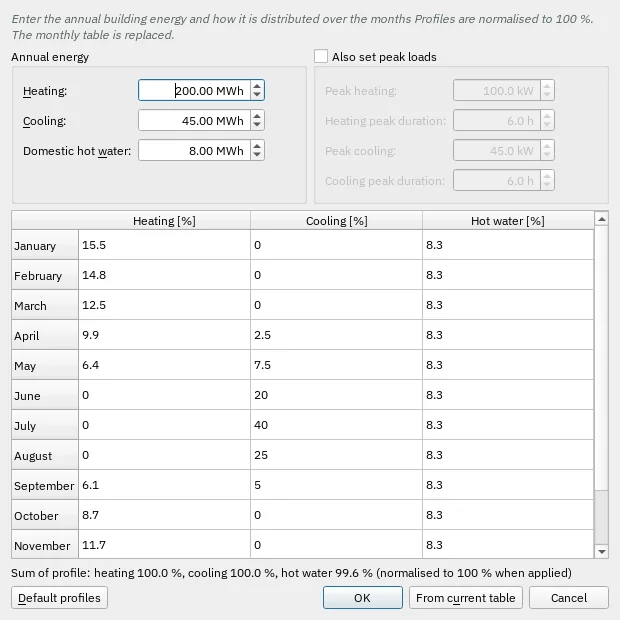
Create or edit monthly shares and seasonal peak shapes, then apply them to the load table. Shares must be normalized consistently with the annual energy. Preview changes before accepting.
Step-by-step workflows · Menus and keyboard
| Control | Meaning / action | Unit | Range / choices | Example value |
|---|---|---|---|---|
| Heating: | Annual heating energy (building side). | MWh | 0 to 1e+06 | 200 |
| Cooling: | Annual cooling energy (building side). | MWh | 0 to 1e+06 | 45 |
| Domestic hot water: | Annual domestic hot water energy. | MWh | 0 to 1e+06 | 8 |
| Peak heating: | Design peak heating power (building side). | kW | 0 to 100000 | 100 |
| Heating peak duration: | Duration of the heating peak. | h | 0 to 730 | 6 |
| Peak cooling: | Design peak cooling power (building side). | kW | 0 to 100000 | 45 |
| Cooling peak duration: | Duration of the cooling peak. | h | 0 to 730 | 6 |
| OK | Accept changes and close. | |||
| Cancel | Close without accepting unapplied edits. | |||
| Default profiles | Restore the built-in seasonal profiles in this dialog. | |||
| From current table | Copy the current monthly table into the profile editor. | |||
| Heating: | Annual heating energy (building side). | GJ | 0 to 3.6e+06 | 720 |
| Cooling: | Annual cooling energy (building side). | GJ | 0 to 3.6e+06 | 162 |
| Domestic hot water: | Annual domestic hot water energy. | GJ | 0 to 3.6e+06 | 28.8 |
| Peak heating: | Design peak heating power (building side). | MW | 0 to 100 | 0.1 |
| Peak cooling: | Design peak cooling power (building side). | MW | 0 to 100 | 0.045 |