 BoreTherm
FMU
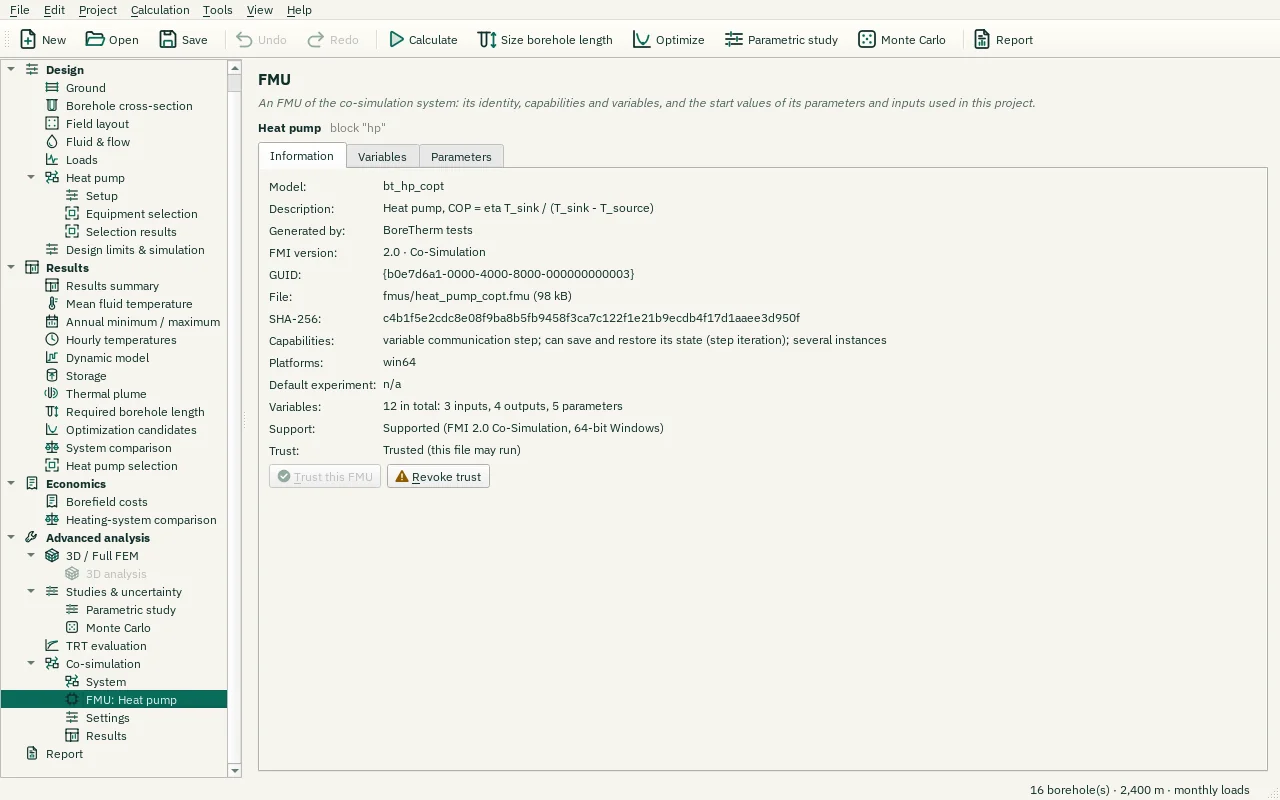
One FMU block of the co-simulation system: its identity (model name, FMI version, generating tool and SHA-256 of the file), the variables it exposes with their units, and its parameters with the values used in this system; overrides can be reset to the FMU's values. Inspecting an FMU never runs its code: it runs only after you trust this exact file (FMU trust), and the trust can be revoked here. Replace file… swaps in a new version; check the changed ports, parameters and the trust again.
Step-by-step workflows · Menus and keyboard
| Control | Meaning / action | Unit | Range / choices | Example value |
|---|---|---|---|---|
| Variable filter | Enter or edit this text/value. | |||
| Causality filter | Select one of the listed alternatives. | All variables / input / output / parameter / calculated parameter / local / independent | ||
| Reset selected to the FMU's values | Restore the selected parameter overrides to the values supplied by the FMU. | |||
| Trust this FMU | Allow BoreTherm to run this FMU's code (remembered for this file, by its SHA-256). | |||
| Revoke trust | Remove the remembered trust decision for this exact FMU hash. A later run will ask again. | |||
| Accept the changed file | The FMU file differs from the one added to the system. Accept it as the new file of this block. |