 BoreTherm
Heat pump selection
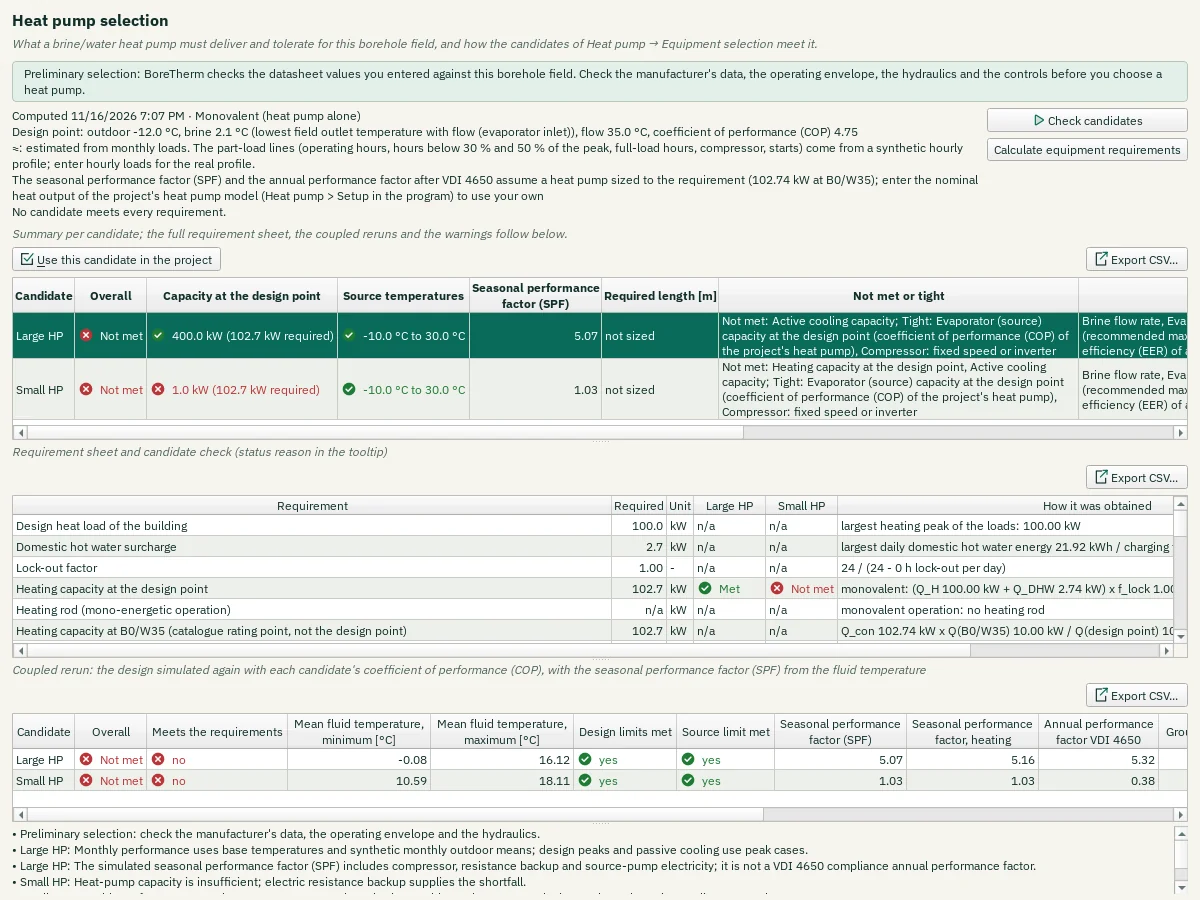
Heat pump > Selection results (also Results > Heat pump selection): first a summary per candidate (overall result, capacity at the design point against the requirement, the source temperatures, the seasonal performance factor and length of the coupled rerun, the lines not met or tight and the missing datasheet values, in words), then the requirement sheet a brine/water heat pump must meet for this borehole field and the check of the ticked candidates of Heat pump > Equipment selection. Calculate equipment requirements gives the sheet alone. Use this candidate in the project makes the candidate of the selected summary row the project's heat pump model (as Use in the project on Equipment selection); the note next to it says why it is not available, for example when the candidate was renamed after the check. Each row is one requirement: capacity at the design point and at B0/W35 (the catalogue rating point, not the design point), domestic hot water surcharge, lock-out factor, heating rod, evaporator capacity and the ground extraction the field was sized for, minimum and maximum source temperature, flow and domestic hot water temperature, temperature lift, brine flow and pump head (field, header and, with passive cooling, the free-cooling heat exchanger; each candidate adds its evaporator, and an external pump gets the sum as information), the evaporator pressure drop against 35 kPa at 3.2 l/min per kW, part-load hours, compressor type, starts and buffer, passive and active cooling, cooling efficiency (EER), seasonal performance factor (SPF) and the annual performance factor after VDI 4650. With monthly loads the part-load lines are estimated from a synthetic hourly profile and marked with ≈. Without a nominal power of the project's heat pump, the seasonal performance factor and the annual performance factor assume a heat pump sized to the requirement (noted). The required value, its unit and how it was obtained are shown; a warning icon marks a value where the project itself is inconsistent. Each candidate has a status column: Met, Tight (margin below the threshold), Not met or n/a, the reason with the required and offered values in the tooltip; a set of identical units is listed as name × n. Below, the coupled rerun: the design simulated again with the candidate's coefficient of performance (COP), giving the seasonal performance factor (SPF) from the fluid temperature, with the minimum and maximum mean fluid temperature, the design limits, the source limit, the seasonal performance factor, the annual performance factor after VDI 4650, the change of the ground extraction and, when chosen, the sized length. Check candidates computes it on a worker with progress and Cancel; it is never recomputed on an edit, only marked out of date. This is a preliminary selection: check the manufacturer's data, the operating envelope, the hydraulics and the controls.
Step-by-step workflows · Menus and keyboard
| Control | Meaning / action | Unit | Range / choices | Example value |
|---|---|---|---|---|
| Check candidates | Simulate the design, compute the requirement sheet and check every ticked candidate of Heat pump → Equipment selection with a temperature-coupled simulation (progress and Cancel). | |||
| Calculate equipment requirements | The requirement sheet only, without checking candidates. | |||
| Export CSV… | Write the displayed numerical table to a CSV file using the selected CSV format. | |||
| Use this candidate in the project | Make the selected candidate the project's heat pump model (Heat pump → Setup), with the performance from the fluid temperature. The borehole length is not changed. |