 BoreTherm
Hourly load generator
Generate an illustrative hourly profile from monthly totals and day/week patterns. Preview and check annual energy and peaks. Generated profiles are assumptions; replace them with measured/design loads when available.
Step-by-step workflows · Menus and keyboard
| Control | Meaning / action | Unit | Range / choices | Example value |
|---|---|---|---|---|
| Annual mean: | Annual mean of the outdoor temperature. | °C | -30 to 40 | 10 |
| Annual amplitude: | Half the difference between the warmest and the coldest day (smooth annual cycle). | K | 0 to 30 | 9 |
| Daily amplitude: | Half the difference between day and night (warmest at 15 h). | K | 0 to 20 | 4 |
| Weather variation: | Standard deviation of the day-to-day weather (random, but the same for the same seed). 0 = smooth curves. | K | 0 to 15 | 3 |
| Coldest day: | Day of the year with the lowest mean temperature (1 = 1 January). | 1 to 365 | 16 | |
| Seed: | Seed of the random weather: the same seed gives the same profile. | 0 to 999999 | 1 | |
| Heating limit: | Heating is needed below this outdoor temperature (heating degree-hours). | °C | -10 to 30 | 15 |
| Cooling limit: | Cooling is needed above this outdoor temperature (cooling degree-hours). | °C | -10 to 40 | 20 |
| Degree-hour offset: | Added to the degree-hours of every hour in use, so that loads also occur in hours without degree-hours (internal gains, losses, hot water circulation). | K | 0 to 10 | 1 |
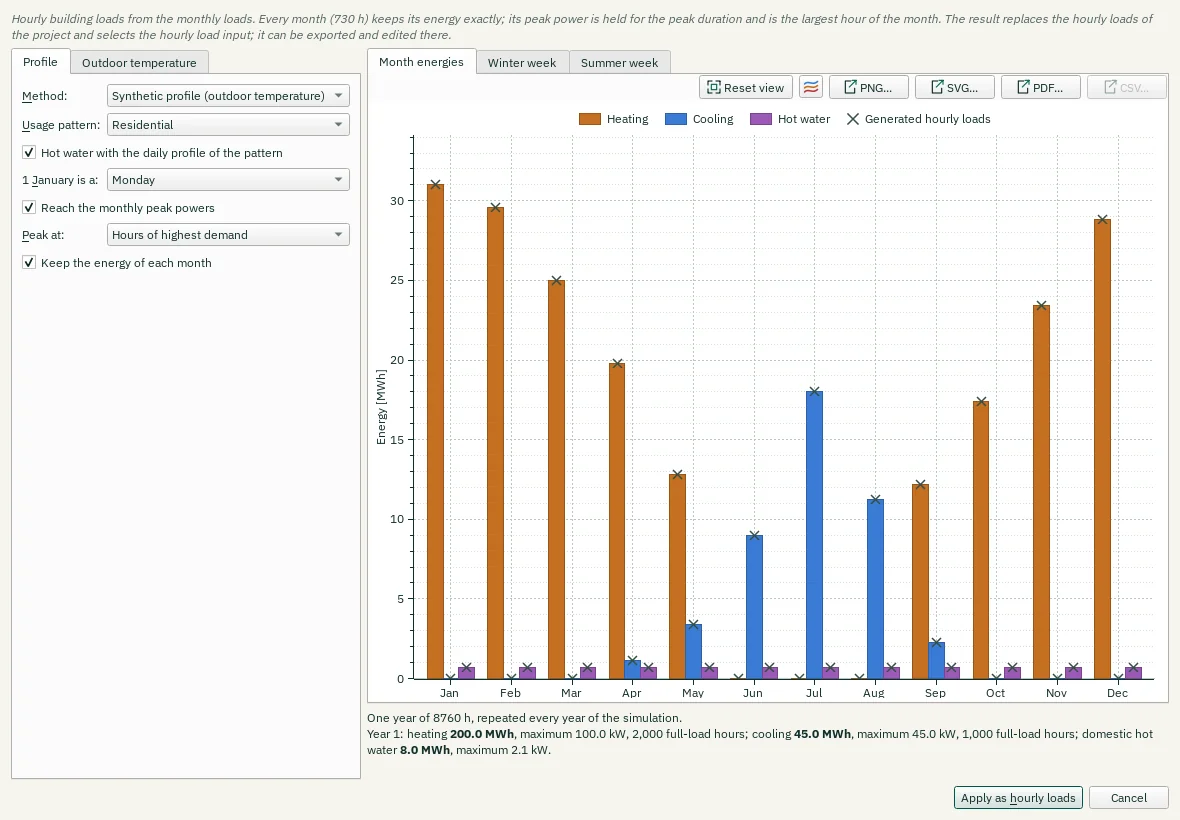
| Method: | Synthetic: heating follows the heating degree-hours and cooling the cooling degree-hours of a synthetic outdoor temperature, weighted with the usage pattern. Equal: every hour of a month gets the month's mean power. | Synthetic profile (outdoor temperature) / Equal distribution | ||
| Usage pattern: | Daily and weekly use. Residential: night set-back, hot water in the morning and the evening. Office: working days 6–18 h, set-back at night and at weekends. Continuous: no pattern. Choosing a pattern also sets its typical heating and cooling limits. | Residential / Office / Continuous (24/7) | ||
| Hot water with the daily profile of the pattern | Unchecked: domestic hot water is spread evenly over each month. | |||
| 1 January is a: | Weekday of 1 January of the first year (office pattern: weekends). | Monday / Tuesday / Wednesday / Thursday / Friday / Saturday / Sunday | ||
| Reach the monthly peak powers | The peak power of each month is held for its duration (whole hours) and is the largest hour of the month. | |||
| Peak at: | Where the peak block lies: at the coldest (heating) or warmest (cooling) hours of the month, or at its end, where the monthly calculation places the peak. | Hours of highest demand / End of the month | ||
| Keep the energy of each month | Checked: the other hours of the month are lowered so that the month keeps its energy. Unchecked: the peak block is added on top, as the monthly calculation treats peaks (the month's energy then grows). | |||
| Reset view | Show all data (also: double-click the plot). | |||
| Chart style button | Chart style: title, axis titles, legend, colours, line widths and markers, fonts, grid and background (also in the chart's context menu). | |||
| PNG… | Export the plot as a PNG image. | |||
| SVG… | Export the plot as a vector SVG image (for Word, Inkscape, …). | |||
| PDF… | Export the plot as a vector PDF. | |||
| CSV… | Export the plotted data as CSV. | |||
| Apply as hourly loads | Replace the project hourly loads with the generated profile; inspect annual totals afterward. | |||
| Cancel | Close without accepting unapplied edits. | |||
| Annual mean: | Annual mean of the outdoor temperature. | °F | -22 to 104 | 50 |
| Annual amplitude: | Half the difference between the warmest and the coldest day (smooth annual cycle). | °F | 0 to 54 | 16.2 |
| Daily amplitude: | Half the difference between day and night (warmest at 15 h). | °F | 0 to 36 | 7.2 |
| Weather variation: | Standard deviation of the day-to-day weather (random, but the same for the same seed). 0 = smooth curves. | °F | 0 to 27 | 5.4 |
| Heating limit: | Heating is needed below this outdoor temperature (heating degree-hours). | °F | 14 to 86 | 59 |
| Cooling limit: | Cooling is needed above this outdoor temperature (cooling degree-hours). | °F | 14 to 104 | 68 |
| Degree-hour offset: | Added to the degree-hours of every hour in use, so that loads also occur in hours without degree-hours (internal gains, losses, hot water circulation). | °F | 0 to 18 | 1.8 |