 BoreTherm
Report setup
Choose output folder, report sections, formats, profile and automatic report actions. PDF and HTML include branded charts and input assumptions. Write reports to a folder with permission to create files.
Step-by-step workflows · Menus and keyboard
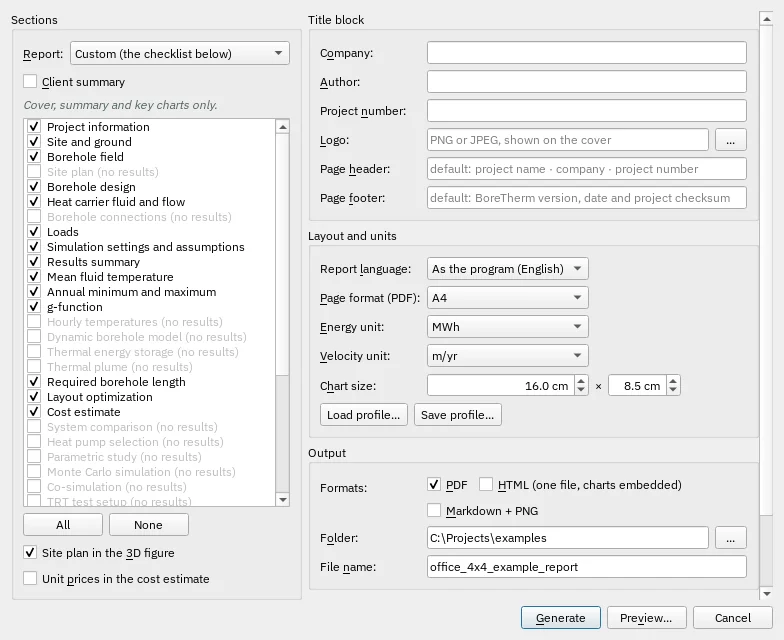
| Control | Meaning / action | Unit | Range / choices | Example value |
|---|---|---|---|---|
| Report: | Which report to write. The title block, units and layout on the right apply to each. | Full report (all sections) / Client summary / TRT evaluation (VDI 4640-5) / Custom (the checklist below) | ||
| Client summary | A short report for clients: project information, results summary, fluid temperature and required length. The checklist below is ignored. | |||
| All | Select every report section. | |||
| None | Clear the report-section selection. | |||
| Site plan in the 3D figure | Show the site plan (the loaded plan and the drilling areas, no-go zones, corridors, connection point and trench) on the ground surface of the 3D figure of inclined boreholes. | |||
| Unit prices in the cost estimate | List every item of the cost estimate with its quantity and unit price. Off: the group totals only (for a report to the client). | |||
| Company: | Enter or edit this text/value. | |||
| Author: | Enter or edit this text/value. | |||
| Project number: | Enter or edit this text/value. | |||
| Logo: | Enter or edit this text/value. | |||
| … | Choose a local file or folder. | |||
| Page header: | Enter or edit this text/value. | |||
| Page footer: | Enter or edit this text/value. | |||
| Page format (PDF): | Select one of the listed alternatives. | A4 / Letter | ||
| Energy unit: | Select one of the listed alternatives. | MWh / kWh | ||
| Velocity unit: | Unit of the groundwater (Darcy) velocity. | m/yr / m/s | ||
| Chart size: | Printed chart width. | cm | 8 to 25 | 16 |
| Printed chart height. | Printed chart height. | cm | 4 to 20 | 8.5 |
| Report language: | Language of the report texts, numbers and dates, independent of the program language. | As the program (English) / Deutsch / English | ||
| Load profile… | Profile file (JSON) - also usable with BoreTherm --report --profile . | |||
| Save profile… | Profile file (JSON) - also usable with BoreTherm --report --profile . | |||
| Enables or disables this option. | ||||
| HTML (one file, charts embedded) | Enables or disables this option. | |||
| Markdown + PNG | Enables or disables this option. | |||
| Folder: | Enter or edit this text/value. | |||
| File name: | File name without extension: .pdf, .html, _md\report.md | |||
| Write a report after every calculation | After every Calculate, Size, Optimize, parametric study and Monte Carlo run. Saved next to the project file as _report_ (in Documents while the project is unsaved), with the profile above. | |||
| HTML | Enables or disables this option. | |||
| Markdown | Enables or disables this option. | |||
| Generate | Generate the configured output. In BTES this creates the operation series; in Report it writes the selected report files. | |||
| Cancel | Close without accepting unapplied edits. | |||
| Preview… | Render the selected report sections for inspection before writing files. |