 BoreTherm
Required borehole length
Inspect convergence, limiting constraint, required borehole length and search trace. Apply length to project changes the project geometry; recalculate and inspect all warnings afterward. Reaching a bound without feasibility is a failed sizing result, not an acceptable design.
Step-by-step workflows · Menus and keyboard
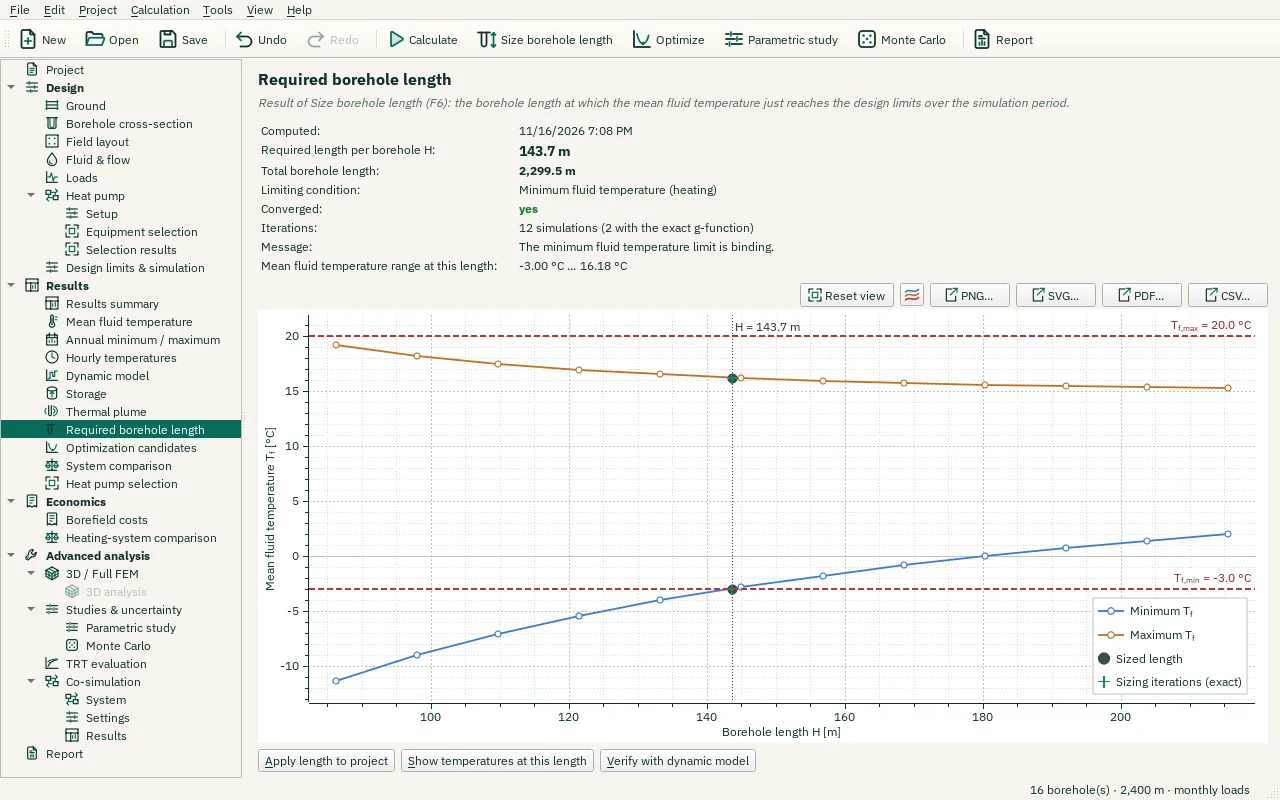
| Control | Meaning / action | Unit | Range / choices | Example value |
|---|---|---|---|---|
| Reset view | Show all data (also: double-click the plot). | |||
| Chart style button | Chart style: title, axis titles, legend, colours, line widths and markers, fonts, grid and background (also in the chart's context menu). | |||
| PNG… | Export the plot as a PNG image. | |||
| SVG… | Export the plot as a vector SVG image (for Word, Inkscape, …). | |||
| PDF… | Export the plot as a vector PDF. | |||
| CSV… | Export the plotted data as CSV. | |||
| Apply length to project | Set the borehole length H of all boreholes to the sized value. | |||
| Show temperatures at this length | Show the simulation at the sized length on the temperature pages. | |||
| Verify with dynamic model | Run the dynamic borehole model (transient fluid and grout, settings on the Design limits simulation page) at the sized length and compare its fluid temperatures with the limits. Needs hourly or time-series loads. | |||
| Show on the Dynamic page | Show the dynamic model at the sized length on the Dynamic model page. | |||
| Size with the co-simulation | Size the borehole length with the co-simulation system in the loop (Co-simulation → System): a coupled run with the FMUs at every length tried. |