 BoreTherm
TRT import
Select time, inlet/outlet temperature, power and optional flow columns with correct units. Preview parsed rows, missing values and timestamp order. Reject or correct duplicate/non-finite samples; retain data-cleaning notes. CSV separator and decimal settings must match the data.
Step-by-step workflows · Menus and keyboard
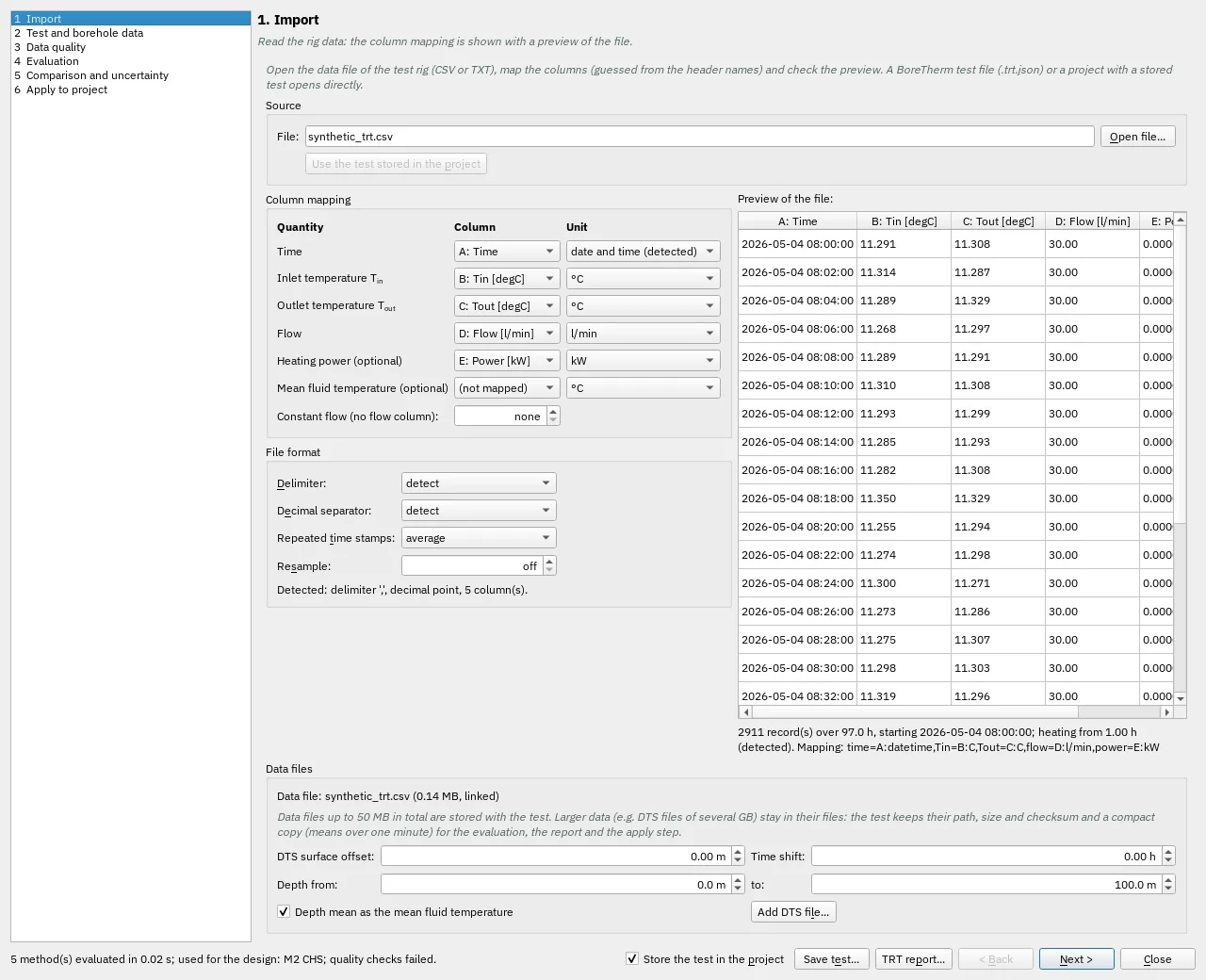
| Control | Meaning / action | Unit | Range / choices | Example value |
|---|---|---|---|---|
| Selected test file | The local test data file selected for import. | |||
| Open file… | Rig data (CSV, TXT, DAT), a BoreTherm test file (.trt.json) or a project with a stored test | |||
| Use the test stored in the project | Load the TRT data already embedded in the open project. | |||
| Time column | Map the source column for this quantity. Leave not mapped only when the required quantity can be supplied by another supported input. | (not mapped) / A: Time / B: Tin [degC] / C: Tout [degC] / D: Flow [l/min] / E: Power [kW] | ||
| Time unit | Select the source unit before import. | elapsed seconds / elapsed minutes / elapsed hours / elapsed days / date and time (detected) / dd.mm.yyyy HH:MM / dd.mm.yyyy HH:MM:SS / mm/dd/yyyy HH:MM:SS | ||
| Inlet temperature column | Map the source column for this quantity. Leave not mapped only when the required quantity can be supplied by another supported input. | (not mapped) / A: Time / B: Tin [degC] / C: Tout [degC] / D: Flow [l/min] / E: Power [kW] | ||
| Inlet temperature unit | Select the source unit before import. | °C / K / °F | ||
| Outlet temperature column | Map the source column for this quantity. Leave not mapped only when the required quantity can be supplied by another supported input. | (not mapped) / A: Time / B: Tin [degC] / C: Tout [degC] / D: Flow [l/min] / E: Power [kW] | ||
| Outlet temperature unit | Select the source unit before import. | °C / K / °F | ||
| Flow column | Map the source column for this quantity. Leave not mapped only when the required quantity can be supplied by another supported input. | (not mapped) / A: Time / B: Tin [degC] / C: Tout [degC] / D: Flow [l/min] / E: Power [kW] | ||
| Flow unit | Select the source unit before import. | l/min / l/s / l/h / m³/h / m³/s / kg/s | ||
| Heat input column | Map the source column for this quantity. Leave not mapped only when the required quantity can be supplied by another supported input. | (not mapped) / A: Time / B: Tin [degC] / C: Tout [degC] / D: Flow [l/min] / E: Power [kW] | ||
| Heat input unit | Select the source unit before import. | W / kW / MW | ||
| Mean temperature column | Map the source column for this quantity. Leave not mapped only when the required quantity can be supplied by another supported input. | (not mapped) / A: Time / B: Tin [degC] / C: Tout [degC] / D: Flow [l/min] / E: Power [kW] | ||
| Mean temperature unit | Select the source unit before import. | °C / K / °F | ||
| Trt constant flow | Constant flow of the test when the file has no flow column (0 = none) | l/min | 0 to 10000 | 0 |
| Delimiter: | Select one of the listed alternatives. | detect / semicolon ; / comma , / tab / spaces | ||
| Decimal separator: | Select one of the listed alternatives. | detect / point 1.5 / comma 1,5 | ||
| Repeated time stamps: | Samples with the same time stamp, e.g. 30 s data with minute stamps | average / spread to the next stamp / keep | ||
| Resample: | Averages the samples on a uniform time step (0 = keep every sample) | s | 0 to 3600 | 0 |
| Fibre position of the ground surface: depth = position - offset | Fibre position of the ground surface: depth = position - offset | m | -10000 to 10000 | 0 |
| Top of the depth range of the mean | Top of the depth range of the mean | m | -10000 to 10000 | 0 |
| Bottom of the depth range of the mean (e.g. the borehole length) | Bottom of the depth range of the mean (e.g. the borehole length) | m | -10000 to 10000 | 100 |
| Added to the DTS times after the calendar times are matched (e.g. -1 h for a DTS in UTC and a logger in CET) | Added to the DTS times after the calendar times are matched (e.g. -1 h for a DTS in UTC and a logger in CET) | h | -48 to 48 | 0 |
| Depth mean as the mean fluid temperature | The mean over the depth range of every DTS profile becomes the mean fluid temperature of the records (one-minute values). | |||
| Add DTS file… | Links a DTS file (fibre position in the first column, one column per time stamp) to the test | |||
| Read the full data | Reads the full data of the compact copy again from the linked files |